Data

Oct 07, 2026

We've doubled the number of free LLM Smart Column runs in every plan, so you can try out and refine more AI-powered columns before using credits.

  • Enterprise: 8 free runs (previously 4)
  • Agency & Team: 4 free runs (previously 2)

The new limits apply automatically. Once you've used your free runs, each computed row costs 0.1 credits. See Credits for details.

Sep 23, 2026

When you set up a

Social Media datasource with keyword search, you now have two new options.

Max content per platform: Set a limit on how many posts are collected from each platform. This keeps one high-volume channel from taking over your dataset.

Collect related comments: Pull in the comments under matching posts as well as the posts themselves. This gives you the conversation around a topic, not just the original post.

You'll find both options when you create a new Social Media datasource.

Jul 13, 2026

We're giving you more room to experiment with Smart Column and Topic Assignment: more included runs, and cheaper overage on top. Here's what's new.

Smart Columns

Included LLM runs per row are doubling across the board:

  • Enterprise: 2 β†’ 4
  • Team: 1 β†’ 2
  • Agency: 2 β†’ 4

And if you do go over, it's a lot cheaper now: overage pricing drops from 0.25 to 0.1 credits per row, on every plan.

Topic Assignment

Same story here. Included runs go from 4 to 6 on Enterprise, Team, and Agency plans, and overage pricing falls from 0.5 to 0.2 credits per row across all plans.

Nothing to do on your end β€” these upgrades are already live on your account, and they apply to existing projects and Smart Columns too, not just new ones.

Jul 13, 2026

You can now import reviews directly from Kununu, the leading employer review platform in the DACH region.

Caplena pulls in employee, applicant, and trainee reviews for any company, including the overall rating, review text, category ratings (work atmosphere, work-life balance, career development, salary, leadership, communication, and more), reviewer department, review type, and employer responses.

To add a source, go to Projects β†’ Import Data β†’ Kununu and enter a company URL, e.g. https://www.kununu.com/de/deutsche-post (supported countries: de, at, ch).

Kununu is Datashake-backed and follows the standard 3-day sync cycle for review platforms.

Jun 25, 2026

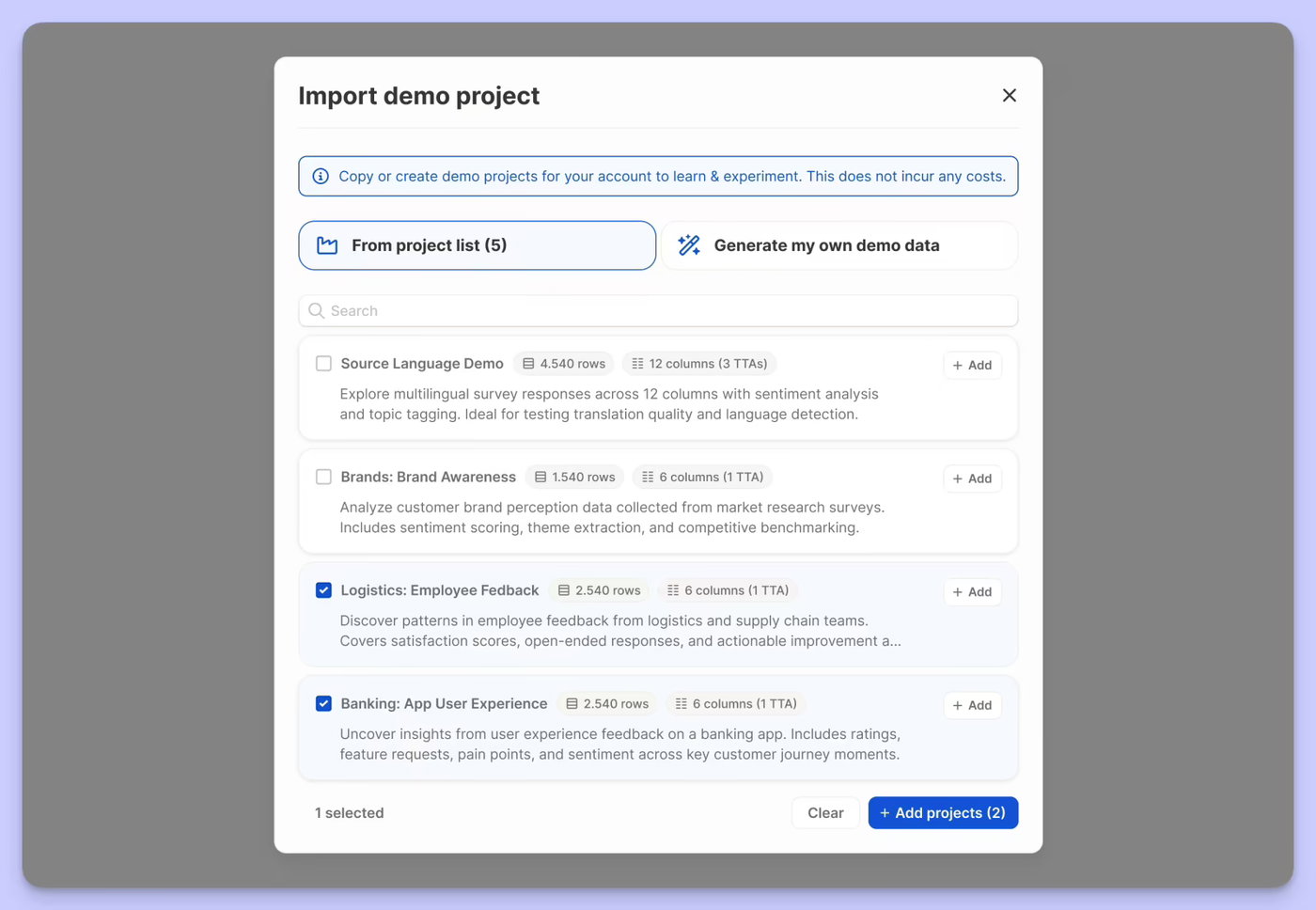
Getting started with realistic data just got a lot more flexible. You can now either pick from a curated list of pre-built demo projects β€” spanning different industries and research types β€” or generate your own from scratch by describing your use case and letting Caplena create a fully analysed project tailored to it.

Whether you're onboarding a new team, exploring a use case before committing real data, or just want to see what Caplena can do, demo projects are now a first-class way to get there.

Jun 23, 2026

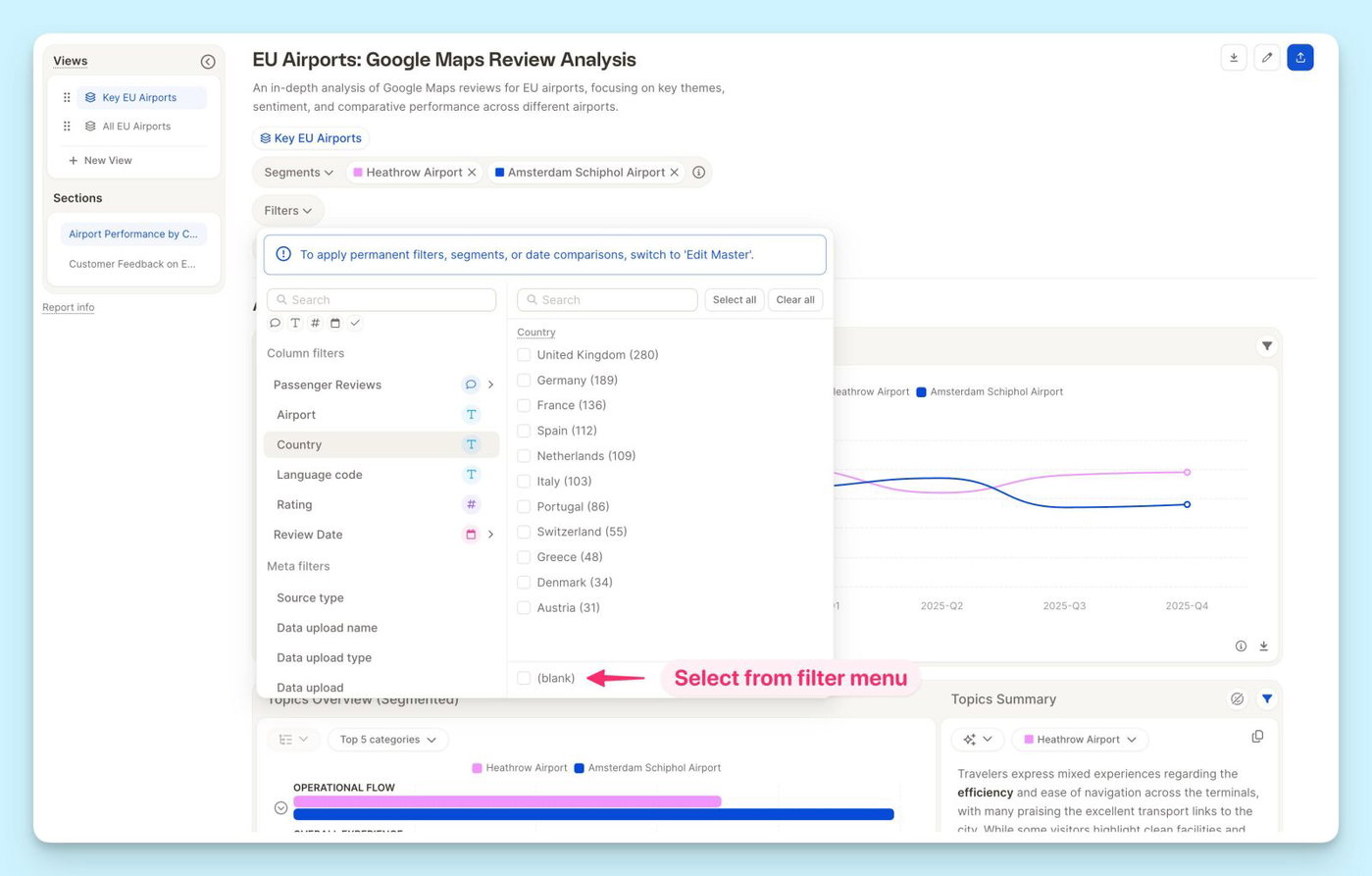
You can now filter any column by blank β€” empty cells are no longer invisible to your filters.

Whether you're tracking down a missing date, a smart column that didn't populate, or a row with an identifier error, just select the "blank" filter and they'll surface instantly. No more hunting through your data manually.

Mar 25, 2026

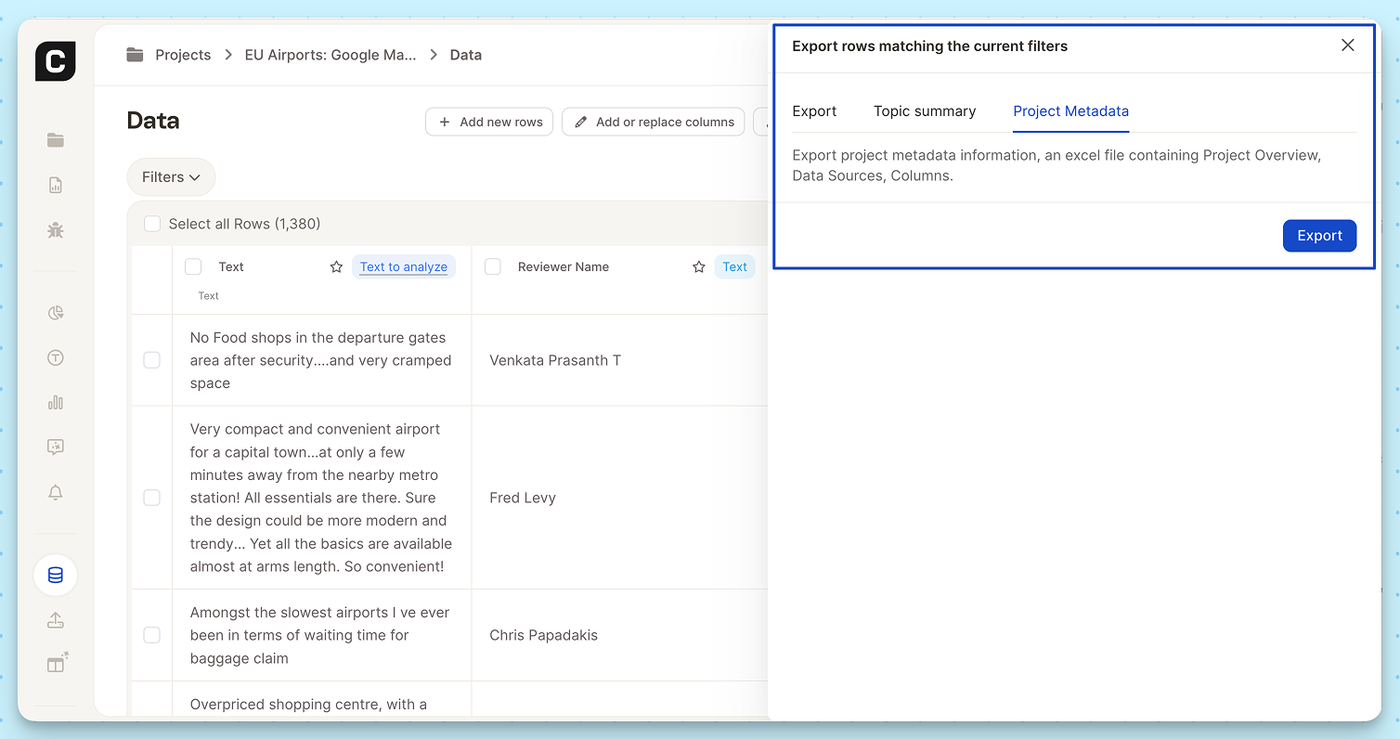
Sometimes you need the blueprint of your project, not just the raw feedback data. We’ve added a new export option that allows you to download the structural overview of your Caplena projects directly to Excel.

This is especially useful for maintaining internal documentation, auditing your data architecture, or sharing project setups with stakeholders who don't need access to the granular text responses.

What’s included in the Excel export?

  • Project Overview: High-level details and settings of your current project.
  • Data Sources: A clear log of where your feedback is originating from.
  • Columns: The exact structure, naming conventions, and metadata of your dataset.

How to use it:

  1. Navigate to the Data view in your project.
  2. Click the Export icon (or trigger an export for your filtered rows).
  3. In the export modal, select the new Project Metadata tab.
  4. Hit Export to download your file.
Feb 20, 2026

We’ve launched a new integration with Trusted Shops, one of Europe’s leading trust and review platforms for online shops. You can now automatically import and analyze your Trusted Shops customer reviews in Caplena. All verified reviews are processed with AI-powered topic and sentiment analysis, transforming raw feedback into structured, actionable insights within minutes.

πŸ‘‰ Set up the integration in your Integrations Settings and get started.

Feb 17, 2026

We’re excited to introduce our new native integration with Decipher / Forsta β€” making it easier than ever to bring open-ended survey data into Caplena and turn it into structured, client-ready insights.

If you’re running studies in Decipher, you can now seamlessly connect your project and start analyzing verbatims in minutes β€” no manual exports, no formatting headaches.

πŸ‘‰ Set up the integration in your Integrations Settings and get started.

Dec 23, 2025

You can now connect Caplena directly to Google Cloud Storage.

This new integration lets you import feedback and text data straight from your Google Cloud Storage buckets into Caplena. Whether you’re working with continuous data exports, archived feedback, or structured text files, Caplena fits seamlessly into your existing cloud setup

πŸ‘‰ Set up the integration in your integrations settings and get started.

Dec 01, 2025

Import your SurveyMonkey responses into Caplena β€” seamlessly.

You can now connect SurveyMonkey directly to Caplena and analyze your survey results with the full power of our AI-driven platform.

With the new integration, you can:

  • Link your SurveyMonkey account in just a few clicks
  • Import responses automatically β€” no more manual CSV uploads
  • Choose the surveys and fields you want to sync
  • Analyze responses instantly with topics, sentiment, drivers & more
  • Keep your insights up-to-date by synchronizing

Ready to try it? Connect your account in Integrations β†’ SurveyMonkey and start analyzing within minutes.