Uploading a topic collection from file? You can now optionally include a description column for each topic.
😌 Simply choose the column in the dropdown when uploading your file. These descriptions help explain the meaning or intent behind each topic, and are visible throughout the platform.
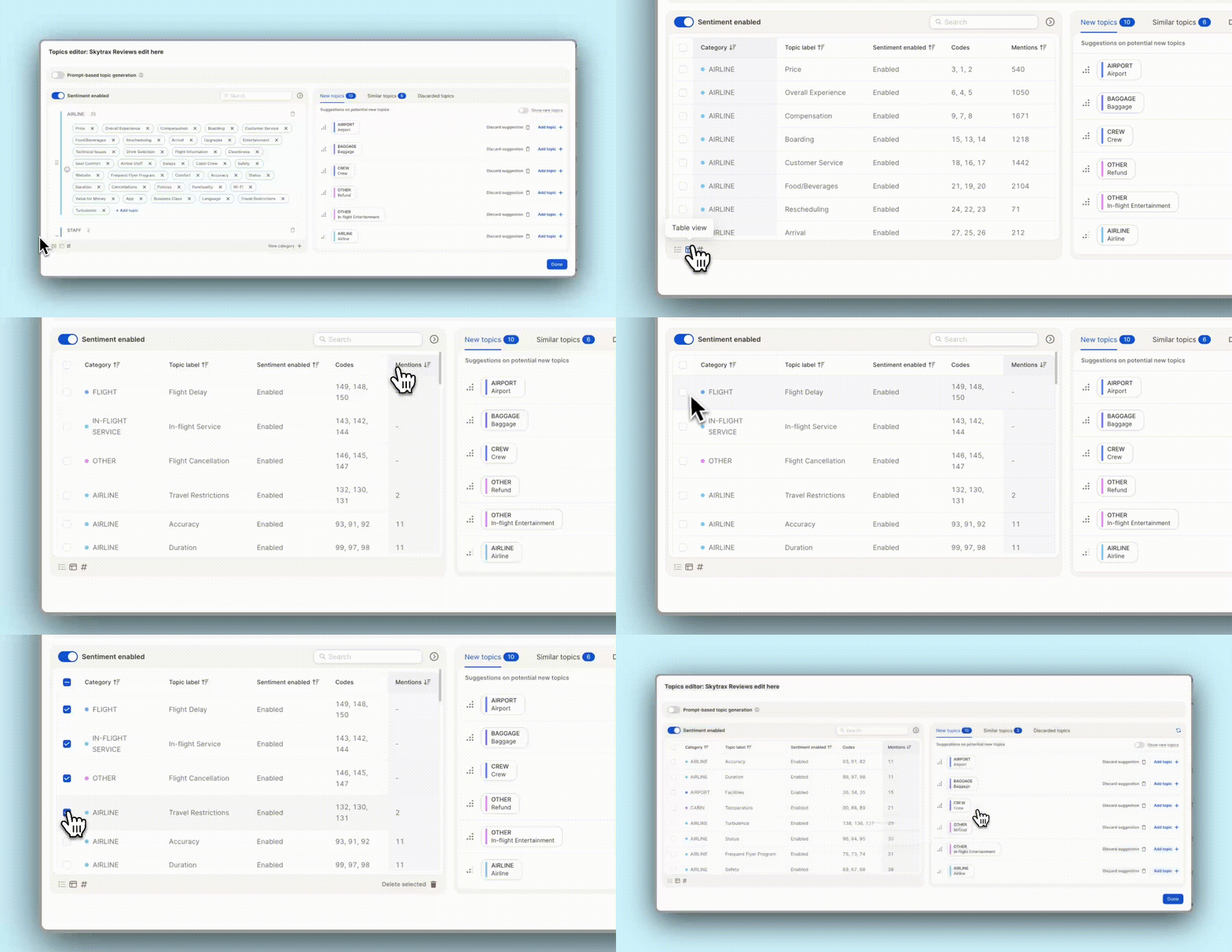
Cleaning up your topic list just got easier. You can now see the number of mentions per topic in the Topic Assistant’s table view. Sort by count to quickly spot low-volume topics. Perfect for finding outliers!
✨ Bonus: Easily bulk-delete underperforming topics in one go. Less noise, more clarity.
Tired of jumping between views to narrow down your data? We’ve revamped and unified filters across the entire Caplena platform—so filtering is now smoother, smarter, and more consistent than ever:
🧩 Filter by Topics & Categories
Pinpoint themes or topic sets right within your reports—no need to switch between Topics and Reports view.
🔢 New Smart Numbers Filter
Need to look at scores, ratings, or counts? Our smart numeric filter lets you quickly slice data by exact values or ranges.
📅 Two Great Date Range Filters
Static Range (e.g. Jan 1–Mar 31, 2025)
Rolling Range (e.g. Last 7 days, Last quarter) Perfect for trend analysis without manual date entry.
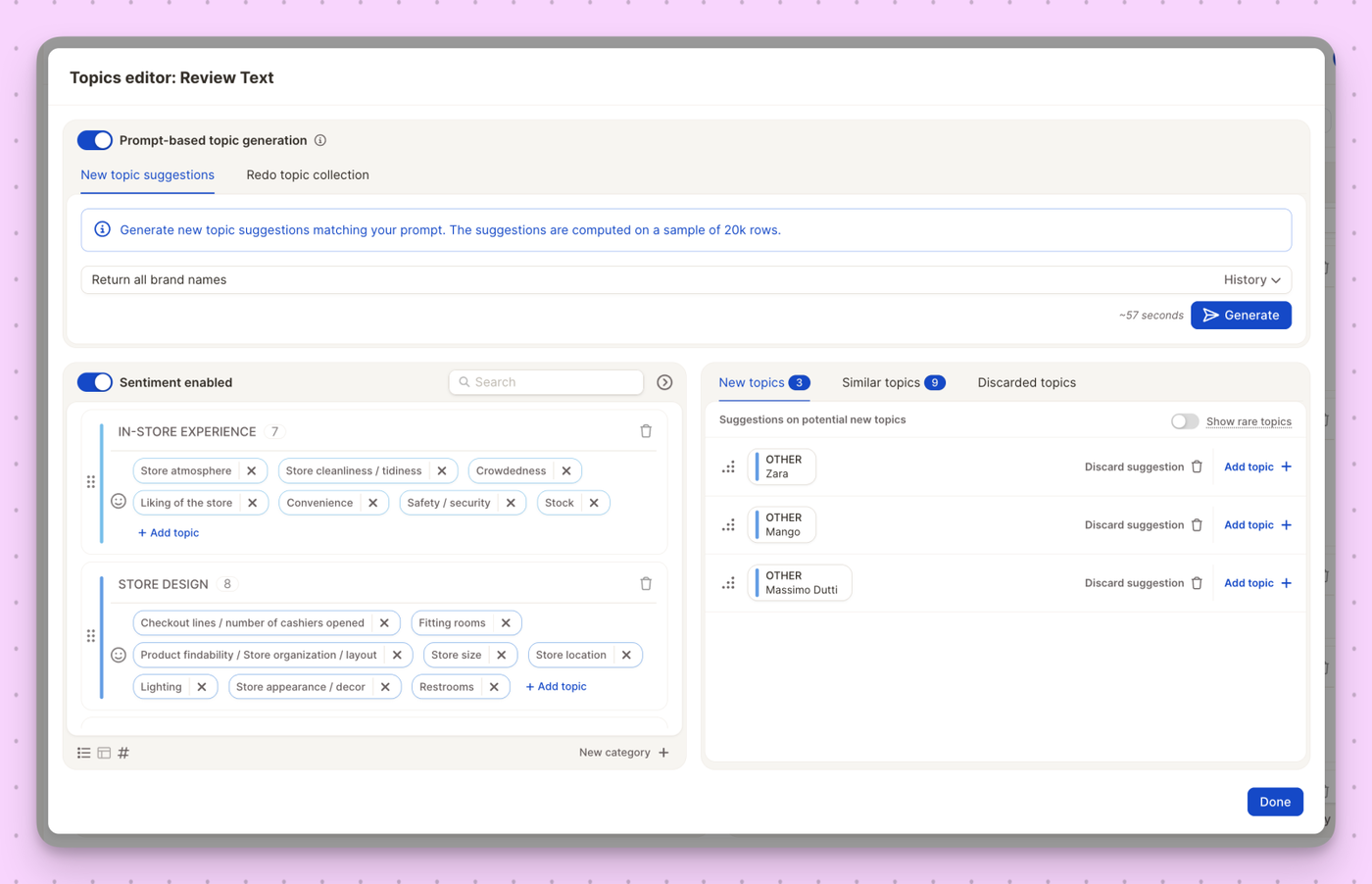
Introducing Prompt-based Topic Generation — your new secret weapon for steering topic detection exactly where you need it to go. Whether you want to zoom in on very specific themes or just give our AI a nudge in the right direction, this feature lets you shape the outcome with precision.
You now have two powerful modes:
🎯 New Topic Suggestions
Add fresh topics on top of your existing collection. Just write a prompt (e.g., “Return all brand names”), review the AI’s suggestions, and add the most relevant ones in seconds.
📚 Redo Topic Collection
Want to start over? Let the AI rebuild your entire topic collection from scratch, based on your prompt — perfect for testing new approaches or exploring your data from a different angle.
No more tedious manual editing. Just tell the AI what you’re after, and it creates the structure for you.
Good news — You can now append new data even if the TTA columns don’t match exactly.
Why this matters:
🛠️ Less Prep Work
No more manually deleting or filling in blank TTA columns just to get your file to upload. Caplena will handle it for you — saving time and frustration.
📂 More Flexibility
Uploading a slightly different file structure? No problem. You’ll no longer hit errors just because a column is missing or extra. We’ll keep things moving.
🚀 Faster Workflows
This small change means fewer interruptions and smoother data handling, especially for recurring or multi-source uploads.
So go ahead — upload with confidence, even if things aren’t 100% identical. We’ve got your back.
Exporting your data for BI tools just got a whole lot smoother. You can now download Topics and Data in a format that plays nicely with Power BI (and other analytics tools too).
What’s included?
Topic Names
Categories
Sentiment
And more — all cleanly structured and ready to plug into your dashboards!
You can now invite unlimited reporting-only users to your Caplena workspace — ideal for sharing insights with larger teams, departments, or external stakeholders.
Whether they're inside or outside your organization, anyone can now access your reports without editing rights — helping you scale insight sharing without limits. 🚀
No limits on reporting-only viewers
Great for broader access without editing rights
Updated Team page to manage reporting-only users with ease
Introducing a small but mighty upgrade to your Caplena workspace: the Collapsible Sidebar!
Now you can easily hide the sidebar in reports to free up more screen space — perfect for deep dives, presentations, or just keeping things clean and focused.
What’s new?
Collapse & expand the sidebar with one click
Enjoy a larger workspace for your insights
Focus on what matters most — your data
Simple. Clean. More space to explore your feedback universe. 🤓
Understanding what truly impacts your customer satisfaction just got even easier! With our new Driver Analysis Insight Element joining the insight element family, you can now explore key drivers and compare impact across segments.
What’s New?
AI-Generated Suggestions–Get tailored recommendations on how to improve key topics, ensuring you take the right actions to boost satisfaction.
Segmented View – Compare impact across multiple segments (e.g., different brands or customer groups) to pinpoint variations in satisfaction drivers.
Driver Impact vs. Mentions Scatterplot–Visually assess which topics have the most significant influence on satisfaction and where you should focus your efforts.
Seamless Switching– Toggle between AI-generated improvement suggestions and the scatterplot for a comprehensive understanding of your data.
👉 Simply add the new driver analysis insight element within a report using a satisfaction score. 🔗 For a detailed video on how to use the new element (with Pro-Tips from André), please check out this link.
Getting to the right insight just got even easier. You can now apply filters directly within the Insight Chat, allowing for more focused, relevant conversations with your data.
Filter by segments, time ranges, or custom fields
Ask targeted questions and get precise answers
Stay in context—no need to switch back and forth
Whether you're digging into a specific customer group or tracking changes over time, filters help you get the answers you need—faster and smarter.