
✨ Spot the wand — and let the Insight Agent support your daily work
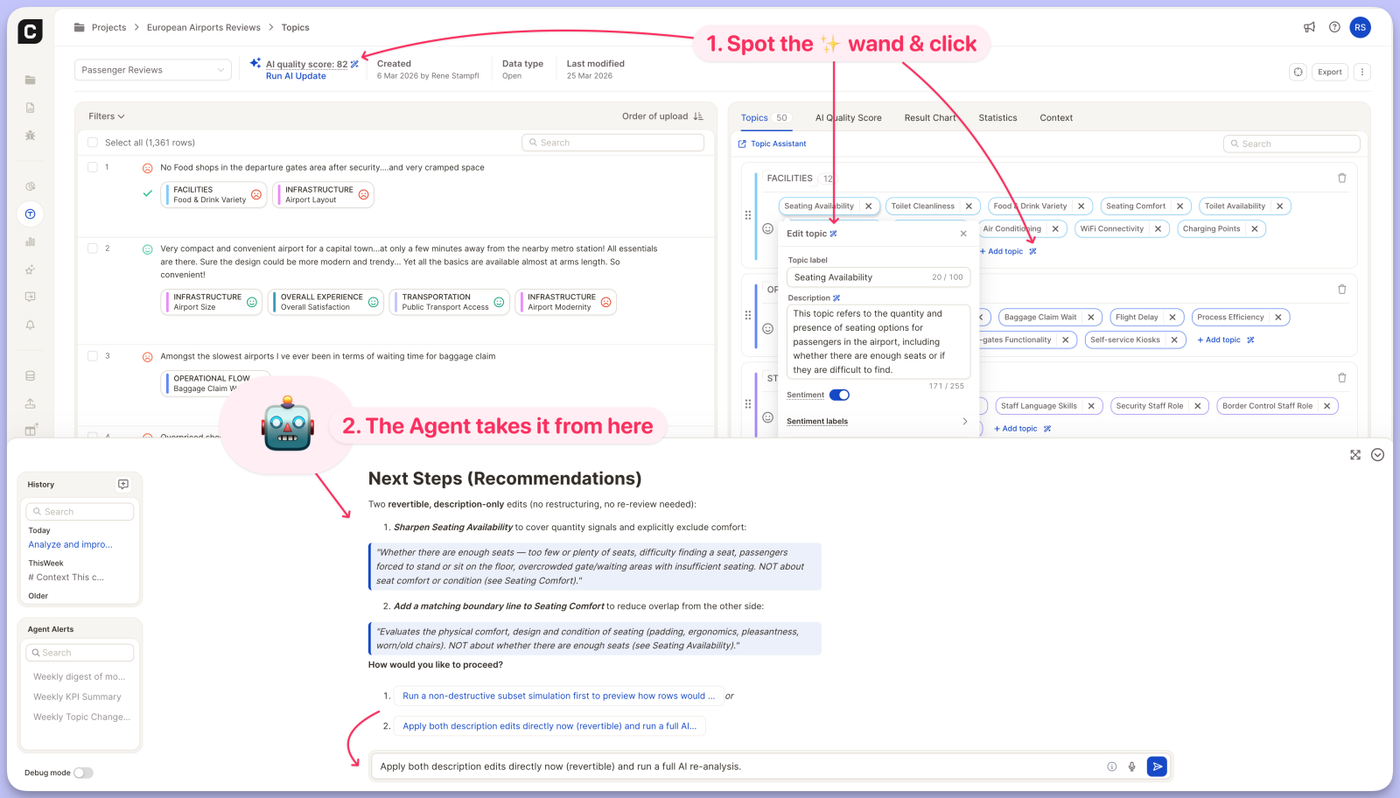
You no longer have to explain to the Insight Agent what you want it to work on. A small magic-wand icon now sits next to the parts of your project where the Agent can help — click it, and the Agent opens with a ready-to-run prompt already filled in for that exact element. We're starting with the Topics view, and you'll see the wand appear next to more elements across Caplena over time.
What's new
Look for the ✨ icon next to these elements in your Topics view:
- AI quality score → "Optimize the AI quality score"
- Add topic → "Suggest more topics for category {CATEGORY}"
- Edit topic → "Analyze and improve assignment of topic {TOPIC} in category {CATEGORY}"
- Topic description → "Improve description for topic {TOPIC} in category {CATEGORY}"
Each prompt is automatically filled with the right context — the category and topic you're looking at — so you can send it as-is or tweak it first. When you click the icon, the Agent panel opens automatically so you can see the prompt land and hit send.
Why it matters
The Insight Agent can already optimize topics, sharpen descriptions, and lift your AI quality score. The hard part was knowing where to start and how to phrase the ask. These shortcuts remove that step: the Agent now meets you exactly where the work is, with the context already in hand.
Give it a try in any Topics view — just look for the wand.